
大家好!今天是2022年7月18日,星期一。近期国内疫情有部分新增,请大家外出一定要做好防护,同时这段时间绵阳的北川周边普降大雨,请谨慎选择出行,注意安全!
今天我们继续为大家带来微信小程序的开发教程,今天为要大家介绍的是关于在小程序中实现侧边分类导航栏的方法。侧边分类导航栏主要用于购物类网站的产品分类导航、会员中心的导航等。下边就看具体内容:
一、首先我们来看最终实现的效果图:
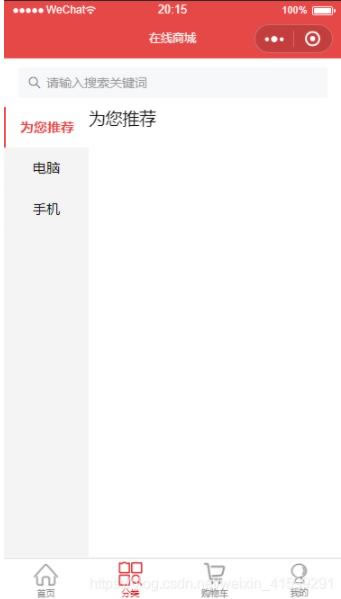
二、接着来看具体代码内容:
1、wxml代码:
<view class='productNav'>
  <!-- 左侧 -->
  <view class='left'>
    <view class="{{active==0?'selected':'normal'}}" id="0" bindtap='switchNav'>为您推荐</view>
    <view class="{{active==1?'selected':'normal'}}" id="1" bindtap='switchNav'>电脑</view>
    <view class="{{active==2?'selected':'normal'}}" id="2" bindtap='switchNav'>手机</view>
  </view>
  <!-- 右侧 -->
  <view class='right'>
    <view class='type'>
      <!-- current:当前所在滑块的 index -->
      <!-- vertical:滑动方向是否为纵向 -->
      <swiper current='{{currentTab}}' vertical='{{true}}'>
        <!-- catchtouchmove 阻止弹窗后滚动穿透 -->
        <swiper-item id="0" catchtouchmove="false">
          为您推荐
        </swiper-item>
        <swiper-item id="1" catchtouchmove="false">
          手机
        </swiper-item>
        <swiper-item id="2" catchtouchmove="false">
          电脑
        </swiper-item>
      </swiper>
    </view>
  </view>
</view>
2、js代码:
Page({
  data: {
    active:0,
    currentTab:0
  },
  switchNav: function (e) {
    var page = this;
    var id = e.target.id;
    if (this.data.currentTab == id) {
      return false;
    } else {
      page.setData({
        currentTab: id
      });
    }
    page.setData({
      active: id
    });
  }
 })
3、wxss代码:
.productNav{
  display: flex;
  flex-direction: row;
  font-family: "Microsoft YaHei"
}
.left{
  width: 25%;
  font-size: 30rpx;
  background-color: #f4f4f4;
}
.left view{
  text-align: center;
  height: 90rpx;
  line-height: 90rpx;
}
.selected{
  background-color: #fff;
  border-left: 2px solid #E54847;
  font-weight: bold;
  color: #E54847;
}
.normal{
  background-color: #f4f4f4;
  border-bottom: 1px solid #f2f2f2;
}
.right{
  width:75%;
  margin: 0;
}
swiper{
  height: 500px;
}
好了,通过以上代码内容就可以实现我们效果图中的样式了,喜欢的话记得收藏哦!
 网站
网站