
自动计算所选商品的总价格,这是在制作购物类网站中经常会用到的功能,在很多CMS系统中都已经有了,但具体是如何实现的呢?今天绵阳动力网络公司就为大家来简单介绍下原理,你学会后可以扩展到其它的项目上来使用哦。
首先我们来看动画演示效果:
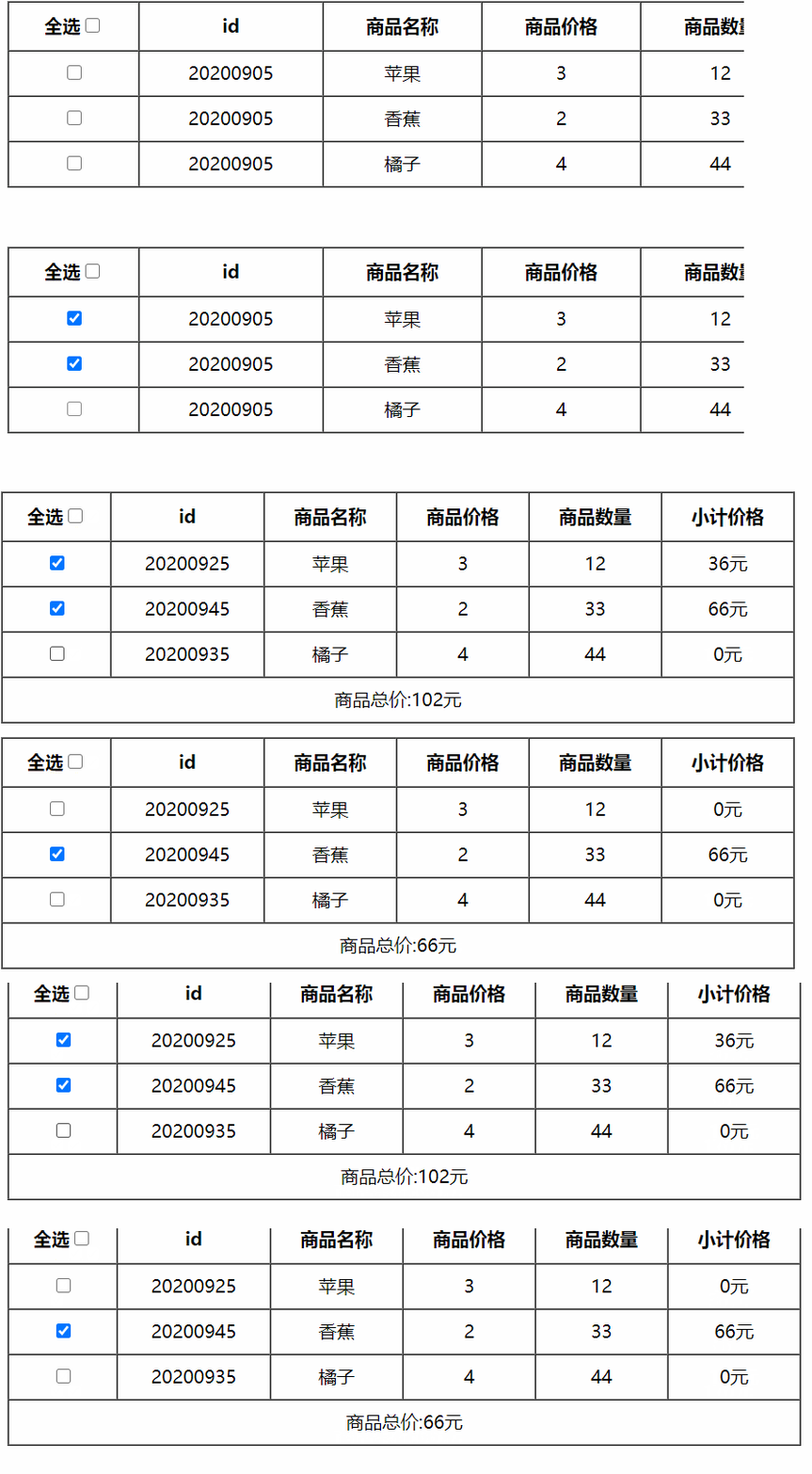
接着就是最核心的代码部分了:
<!DOCTYPE html>
<html lang="en">
<head>
 <meta charset="UTF-8">
 <meta name="viewport" content="width=device-width, initial-scale=1.0">
 <title>Document</title>
 <style>
  table {
   width: 700px;
   text-align: center;
  }

  tr,
  th {
   height: 40px;
  }
 </style>
 <script src="../vue.js"></script>
</head>

<body>
 <div class="box">
  <table cellspacing='0' border="solid 1px">
   <thead>
    <tr>
     <th>全选<input type="checkbox" v-model='isAllChecked'></th>
     <th>id</th>
     <th>商品名称</th>
     <th>商品价格</th>
     <th>商品数量</th>
     <th>小计价格</th>
    </tr>
   </thead>
   <tbody>
    <tr v-for='item in goods'>
     <td><input type="checkbox" v-model='item.isCheck'></td>
     <td>{{item.id}}</td>
     <td>{{item.name}}</td>
     <td>{{item.price}}</td>
     <td>{{item.num}}</td>

     <!-- 计算每个商品的价格根据选中的状态 -->
     <td>{{goodsPrice(item)}}元</td>
    </tr>
    <tr>
     <td colspan="6">商品总价:{{total}}元</td>
    </tr>
   </tbody>
  </table>
 </div>

 <script>
  var vm = new Vue({
   el: '.box',
   methods: {

    // 商品小计
    goodsPrice(item) {
     var sum = 0;
     // 选中就计算价格
     if (item.isCheck) {
      sum = item.price * item.num;
     }
     return sum;
    }

   },
   data: {
    goods: [
     {
      id: 20200925,
      name: '苹果',
      price: 3,
      num: 12,
      isCheck: false,
     },
     {
      id: 20200945,
      name: '香蕉',
      price: 2,
      num: 33,
      isCheck: false,
     },
     {
      id: 20200935,
      name: '橘子',
      price: 4,
      num: 44,
      isCheck: false,
     },
    ]
   },
   computed: {

    isAllChecked: {
     /*
      this.goods.every(el=>el.isCheck)返回结果为true 或者false

     遍历下方每一个isCheck的状态、
      1、 都选中返回true---------即全选为true,
      2、 有一个没选中返回false---即全选为false
     */
     get() {
      return this.goods.every(el => el.isCheck)
     },
     set(val) {
      // 全选的状态true、false两种状态
      console.log(val);

      // val为true即全选的时候、下方每一个isCheck也是true
      // val为false即全选的时候、下方每一个isCheck也是false
      return this.goods.forEach(el => el.isCheck = val);
     }
    },


    // 根据选中状态计算商品的价格
    total() {
     var sum = 0;
     this.goods.forEach(el => {
      if (el.isCheck) {
       sum += el.price * el.num;
      }
     })
     return sum;

    },

   }
  })
 </script>
</body>
</html>
好了,以上代码就可以实现我们今天为大家讲的自动计算商品总价格的方法了,希望对你的网站建设有所帮助,如果喜欢的话记得收藏哦!
 网站
网站