
首选我们先看一下登录界面的最终效果:
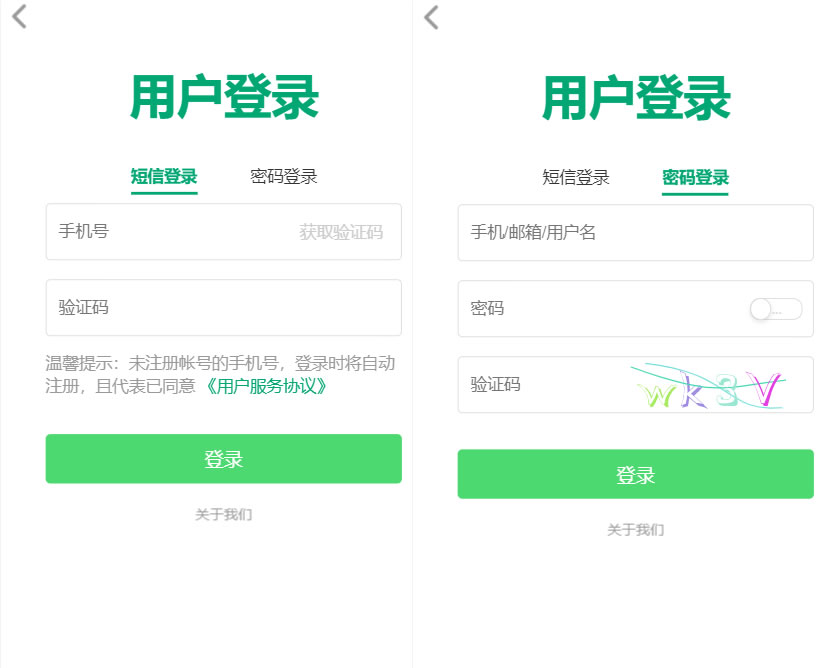
其次是具体实施的步骤和相关代码:
为了实现这个效果,我们采用vue 实现用户登录方式的切换。在 data 当中,定义一个标识符 loginWay,用来表示是用短信登录还是密码登录,true代表短信登录,false 代表密码登录,代码如下所示:
data() {
 return {
  loginWay: true
 }
}
在短信登录和密码登录上,进行动态样式绑定,loginWay为true就短信登录绑定动态样式on,loginWay为false就密码登录绑定动态样式on,并且也绑定点击事件,进行设置 loginWay的true和false,代码如下所示:
<h2 class="login_logo">用户登录</h2>
 <div class="login_header_title">
  <a href="javascript:;" rel="external nofollow" rel="external nofollow" rel="external nofollow" :class="{on: loginWay}" @click="loginWay = true">短信登录</a>
  <a href="javascript:;" rel="external nofollow" rel="external nofollow" rel="external nofollow" :class="{on: !loginWay}" @click="loginWay = false">密码登录</a>
 </div>
对于短信登录和密码登录的内容,同样也设置动态样式绑定。当为loginWay为true 的时候设置短信登录为on,当为loginWay为false 的时候设置密码登录为on,代码如下所示:
<div :class="{on: loginWay}">
 <section class="login_message">
  <input type="tel" maxlength="11" placeholder="手机号">
  <button disabled="disabled" class="get_verification">获取验证码</button>
 </section>
 <section class="login_verification">
  <input type="tel" maxlength="8" placeholder="验证码">
 </section>
 <section class="login_hint">
  温馨提示:未注册帐号的手机号,登录时将自动注册,且代表已同意
  <a href="javascript:;" rel="external nofollow" rel="external nofollow" rel="external nofollow" >《用户服务协议》</a>
 </section>
</div>
<div :class="{on: !loginWay}">
 <section>
  <section class="login_message">
   <input type="tel" maxlength="11" placeholder="手机/邮箱/用户名">
  </section>
  <section class="login_verification">
   <input type="tel" maxlength="8" placeholder="密码">
   <div class="switch_button off">
    <div class="switch_circle"></div>
    <span class="switch_text">...</span>
   </div>
  </section>
  <section class="login_message">
   <input type="text" maxlength="11" placeholder="验证码">
   <img class="get_verification" src="./images/captcha.svg" alt="captcha">
  </section>
 </section>
</div>
好了,通过以上三步就可以实现登录方式的切换了,如果你正好需要就赶紧加到你的网站中吧。
 网站
网站