
绵阳动力网络公司为大家带关于asp.net开发微信公众平台教程之获取用户消息并处理的相关资料,需要的朋友可以参考下
获取用户消息
用户发送的消息是在微信服务器发送的一个HTTP POST请求中包含的,获取用户发送的消息要从POST请求的数据流中获取
微信服务器推送消息到服务器的HTTP请求报文示例
POST /cgi-bin/wxpush? msg_signature=477715d11cdb4164915debcba66cb864d751f3e6×tamp=1409659813&nonce=1372623149 HTTP/1.1
Host: qy.weixin.qq.com
从POST请求中获取数据
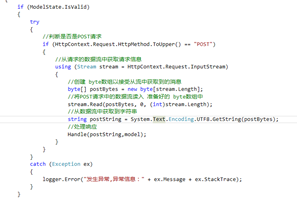
这样获得的用户消息可能有两种情况:加密后的消息或是未加密的消息,这与你在微信公共平台配置网站时 消息加解密模式的选取 有关,如果选择了明文模式,则不会加密,如果选择了兼容模式,则密文和明文都存在,如果选择的是安全模式,则用户消息会被加密,需要解密后才能进一步处理
2.回复用户消息
参考微信公共平台开发文档
•文本消息
<xml>
<ToUserName><![CDATA[{0}]]></ToUserName>
<FromUserName><![CDATA[{1}]]></FromUserName>
<CreateTime>{2}</CreateTime>
<MsgType><![CDATA[text]]></MsgType>
<Content><![CDATA[{3}]]></Content>
</xml>
•图片消息
<xml>
<ToUserName><![CDATA[{0}]]></ToUserName>
<FromUserName><![CDATA[{1}]]></FromUserName>
<CreateTime>{2}</CreateTime>
<MsgType><![CDATA[image]]></MsgType>
<Image>
<MediaId><![CDATA[{3}]]></MediaId>
</Image>
</xml>
消息格式已经有了,接着我们只需要设置相应的参数即可。
responseContent = string.Format(ReplyType.Message_Text,
  FromUserName.InnerText,
  ToUserName.InnerText,
 DateTime.Now.Ticks,
  String.IsNullOrEmpty(reply)?"Sorry,I can not follow you." :reply);
3.用户消息与服务器消息的加密解密
微信公共平台开发者文档中提供有c++,C#,java等各种语言的加密解密示例,我们用到的是C#,只需要将其中的两个文件添加到项目中即可,Sample.cs是微信团队给出的示例代码,不需要引用,对
WXBizMsgCrypt.cs与Cryptography.cs文件添加引用即可。为了进一步封装和方便调用,我又新建了一个类WeChatSecurityHelper
类中的定义两个方法,分别来进行加密(EncryptMsg)和解密(DecryptMsg),创建一个WXBizMsgCrypt对象,调用它的方法加解密,具体代码可见代码示例
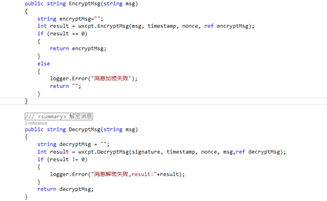
WeChatSecurityHelper
using System.Collections.Generic; using System.Linq;
 using System.Text; using System.Threading.Tasks;
  namespace Common {   public class WeChatSecurityHelper   {
     /// <summary>
     /// 定义Token,与微信公共平台上的Token保持一致
   /// </summary>
     private const string Token = "StupidMe";
     /// <summary>
     /// AppId 要与微信公共平台上的 AppId 保持一致
   /// </summary>
     private const string AppId = "11111111111";
    /// <summary>
     /// 加密用
   /// </summary>
     private const string AESKey = "pvX2KZWRLQSkUAbvArgLSAxCwTtxgFWF3XOnJ9iEUMG";       private static Tencent.WXBizMsgCrypt wxcpt = new Tencent.WXBizMsgCrypt(Token, AESKey, AppId);
     private string signature,timestamp,nonce;
     private static LogHelper logger = new LogHelper(typeof(WeChatSecurityHelper));
         public WeChatSecurityHelper(string signature, string timestamp, string nonce)
     {
       this.signature = signature;
       this.timestamp = timestamp;
      this.nonce = nonce;
     }
      /// <summary>
     /// 加密消息
   /// </summary>
    /// <param name="msg">要加密的消息</param>
   /// <returns>加密后的消息</returns>
     public string EncryptMsg(string msg)
     {
       string encryptMsg="";
      int result = wxcpt.EncryptMsg(msg, timestamp, nonce, ref encryptMsg);
      if (result == 0)
       {
         return encryptMsg;
       }
      else
{
         logger.Error("消息加密失败");
        return "";
      }
    }
       /// <summary>
      /// 解密消息
   /// </summary>
    /// <param name="msg">消息体</param>
    /// <returns>明文消息</returns>
     public string DecryptMsg(string msg)
     {
       string decryptMsg = "";
      int result = wxcpt.DecryptMsg(signature, timestamp, nonce, msg,ref decryptMsg);
       if (result != 0)
      {
         logger.Error("消息解密失败,result:"+result);
      }
      return decryptMsg;
    }
  }
}
 网站
网站